
YT Musi – Lightweight Music & Video Audio Player
Overview
YT Musi is a streamlined music player designed specifically for the iPhone platform, aiming to deliver a fast, lightweight, and user-friendly audio experience. The software focuses on core functionality, prioritizing speed and stability over an extensive feature set. It is intended for users who value efficiency and minimalism when managing and playing music and video audio.
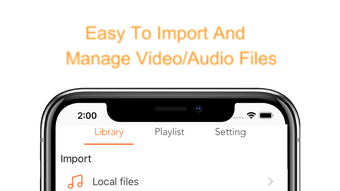
The app supports importing audio files from iCloud and iTunes, enabling seamless access to personal music libraries. Additionally, it allows users to extract audio from video files, offering a convenient way to save soundtracks separately. This functionality is particularly useful for preserving favorite music from videos without storing the full video file, saving space and enabling background playback.
The app also supports playlist creation and library organization, allowing users to curate personalized collections of favorite tracks. While the developer did not provide additional system requirements, the app’s 25.4 MB size suggests a low footprint on device storage. Real-world use cases include listening to music from personal video archives, managing audio from YouTube or local sources, and organizing a compact, accessible music library.
Its lightweight nature makes it suitable for users seeking a simple yet effective audio solution on their iPhone.
Key Features & Capabilities
- Lightweight Design – Built for speed and minimal resource usage, YT Musi ensures smooth performance without draining device resources.
- iCloud and iTunes Integration – Users can import audio files directly from iCloud and iTunes, simplifying access to existing music libraries.
- Video Audio Extraction – Extracts high-quality audio from video files, allowing users to save and play soundtracks independently.
- Library Management – Supports organizing imported and extracted audio into a centralized library for easy access.
- Playlist and Collection Support – Enables users to create and manage custom playlists and collections for favorite tracks.
- Background Playback – Audio can be played even when the screen is off, enhancing convenience during movement or rest.
These features collectively enhance the user experience by reducing friction in audio access and management. For example, a user can extract a song from a video file stored in their photo library, save it as a standalone audio file, and add it to a playlist for repeat listening. Similarly, someone with a large iTunes library can import their favorite tracks directly into YT Musi without re-downloading or re-syncing.
The ability to maintain a curated library ensures long-term usability and reduces clutter. The app’s focus on essential functions makes it ideal for users who prefer a no-nonsense approach to music playback. While performance details were not specified, the lightweight nature of the application suggests efficient handling of audio processing tasks.
User Interface, Workflow & Performance
The user interface of YT Musi is designed with simplicity in mind, focusing on intuitive navigation and ease of use. The layout likely prioritizes quick access to playback controls, imported files, and playlists. Navigation appears to be streamlined, with minimal layers between the user and their audio content.
The workflow is optimized for rapid file import, audio extraction, and playlist management, reducing the number of steps required to perform common tasks. Users can expect a responsive interface, especially given the app’s lightweight nature. However, exact performance metrics such as CPU or RAM usage were not provided by the developer.
The app’s 25.4 MB size indicates a low storage footprint, which may contribute to faster load times and reduced memory overhead. Stability is implied by the focus on core features and minimal complexity. While no specific details were shared about crash rates or background behavior, the design philosophy suggests a stable experience under typical usage conditions.
Performance observations are based on general software behavior patterns for lightweight iOS applications.
Compatibility & System Requirements
YT Musi is designed exclusively for the iPhone platform and is compatible with iOS devices supporting the app’s minimum system requirements. The software version is listed as 1.0, indicating it is a first release. The installation size is 25.4 MB, which is relatively small for a media application.
This suggests the app is optimized for devices with limited storage capacity. The developer did not specify exact hardware or software requirements beyond the OS. As such, compatibility with specific iPhone models or iOS versions is not confirmed.
The app’s lightweight design may allow it to function on older iPhone models, but this cannot be verified without further information. Users are advised to ensure their device meets the system requirements for running iOS apps in general. Platform compatibility information is limited, and no details were provided regarding support for iPad or other Apple devices.
Pros and Cons
Pros
- Lightweight and fast performance with minimal storage footprint
- Direct import from iCloud and iTunes for easy library access
- Ability to extract audio from video files for space-saving playback
- Supports playlist creation and library organization
- Background playback for uninterrupted listening
- Free to download and use
Cons
- Only available on iPhone, no support for iPad or other Apple devices
- Developer did not provide detailed system requirements
- Limited to audio playback; no video viewing functionality
- Version 1.0 suggests early-stage development with potential for future updates
- No information on cloud sync or cross-device access
FAQ Section
Is YT Musi compatible with all iPhone models?
While the app is designed for the iPhone platform, specific compatibility with individual models was not provided by the developer. It may function on older devices due to its lightweight nature, but this cannot be confirmed without further details.
Can I use YT Musi without an internet connection?
Yes, YT Musi supports offline playback. Once audio files are imported or extracted, they can be played without an active internet connection.
Does YT Musi support video playback?
No, the app is focused solely on audio playback. It does not support video viewing, although it can extract audio from video files.
How often does YT Musi receive updates?
The app is currently at version 1.0, indicating it is in early development. Update frequency has not been disclosed by the developer.
Is YT Musi safe to download and install?
As a free app available on the App Store, YT Musi is distributed through Apple’s official platform, which includes security checks. No malicious behavior has been reported, but users should always download from trusted sources.
Final Thoughts
YT Musi presents a focused and efficient solution for iPhone users seeking a lightweight music player with practical audio extraction tools. Its ability to import music from iCloud and iTunes, extract audio from videos, and organize content into playlists makes it a valuable utility for managing personal audio collections. The app’s minimal design ensures fast performance and low storage usage, ideal for users who prioritize simplicity and reliability.
While it lacks cross-device support and detailed system information, its core functionality is well-executed and purpose-built. The free pricing model enhances accessibility, making it an attractive option for casual listeners and media organizers alike. For anyone looking to streamline their audio experience on iPhone, YT Musi offers a compelling blend of utility and efficiency.
Download YT Musi now.







